You can have the best fusion splicer on the market and still lose an hour per closure if your table is a mess. Field splicing is won or lost in the first ten minutes after you sit down: where the splicer sits, where the cleaver sits, where the trash goes, where the closure rests, where the slack loops. Get it right and you splice 24 fibers in 30 minutes. Get it wrong and you are crawling around looking for a dropped sleeve while the contractor stares at you.
This guide walks through how we set up a splicing table for FTTH and OSP work — what gear to bring, how to lay it out, how to handle power and lighting, and how to keep the surface clean enough that your splice loss numbers stay tight.
Why the Splicing Table Matters More Than You Think
The splicing table is your operating room. Everything that happens to a fiber between the cable jacket and the heat shrink oven happens on that table. Three things determine splice quality:
- Cleanliness. A single dust particle on a cleaved end face is a 0.05 dB hit and a fail on tight loss budgets.
- Stability. A wobbly table moves fibers in the V-grooves between cleave and arc. That shows up as core misalignment and high estimated loss.
- Workflow. Reaching across the splicer to grab a sleeve knocks fiber out of the holders. Tools should land where your hand naturally goes.
A good table addresses all three. A folding card table with no organization addresses none of them.
Choosing the Right Splicing Table
Field splicing tables come in three flavors:
Dedicated Fiber Splicing Tables
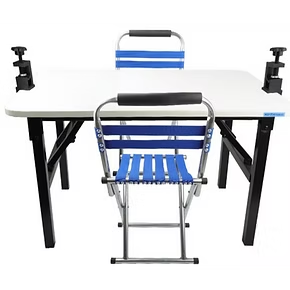
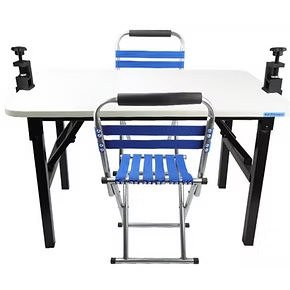
Purpose-built tables like the cabling splicing table have a flat, wipeable surface, integrated tool holders, a fiber scrap container, and lockable legs. They are the right answer for any tech doing splicing more than once a week. Expect to pay $300 to $700 for a quality model.
Splicing Van Built-Ins
Most OSP splicing vans have a built-in workbench along one wall, with overhead lighting, 12 V outlets, shore power inlets, and storage drawers. If you have a dedicated splicing van, this is your primary table. Add a slide-out shelf for the splicer so you can angle it toward your seat.
Improvised Field Tables
For drop work, you may use a folding camp table or even the lowered tailgate of a van. These work for 1 to 4 splices but are not appropriate for backbone work. If you go this route, bring a non-slip mat to anchor the splicer and a windscreen if you are outside.
The Standard Splicing Table Layout
Here is the layout we use across our crews. Imagine you are seated at the table looking down at the surface.
| Zone | What Lives There | Why |
|---|---|---|
| Center | Fusion splicer, oriented with screen toward you | Both hands reach the V-grooves naturally; screen is in your eyeline |
| Left of splicer | Cleaver, fiber stripper, alcohol wipes | Right-handed prep: strip, clean, cleave, then move right into splicer |
| Right of splicer | Heat shrink sleeves, completed splice tray, OTDR launch cord | Post-splice items live where finished fiber exits the oven |
| Front edge | Fiber scrap container (clamped to table edge) | Cleaved ends drop straight in; no scraps on the floor |
| Back of table | Closure, splice tray with work area, slack management | Closure is open and supported, fibers route forward to splicer |
| Far left or right | Power strip, batteries, OTDR, power meter, light source | Test gear stays out of the splice work zone |
The two non-negotiables: the splicer goes in the center, and the scrap container clamps to the front edge. Everything else can shift to suit a left-handed tech or a different closure type.
Tools to Have Within Arm's Reach
A short tool list, in the order you will reach for them during a splice:
- Jacket stripper for the buffer tube or drop cable
- 250 micron fiber stripper (Miller-style)
- Lint-free wipes and 99% isopropyl alcohol
- Precision cleaver — see our 900-micron mechanical cleaver for drop work
- Heat shrink sleeves (40 mm for single fiber, 60 mm for ribbon)
- Splice tray matched to the closure
- Fiber inspection scope — the Wi-Fi fiber microscope works well for verifying connector cleanliness on pigtails
- Power meter and visual fault locator for in-process verification
If you are setting up a new tech's bench, QBL sells the Fiber Splicing Kit and the New Hire Fiber Tech Bundle, but we do not have the packing list for either yet, so we cannot say what they include; contact us for the contents before you order.
Power, Battery, and UPS
Splicers draw 30 to 60 W during arc and oven cycles, plus a sustained 5 to 10 W idle. Plan power accordingly:
- Shore power: A 15 A circuit handles a splicer, OTDR, charger, and lighting easily.
- Battery: Modern splicers have hot-swap batteries good for 100 to 300 splices. Bring two charged spares.
- Inverter: A 400 W pure-sine inverter wired to the van battery powers the splicer indefinitely with the engine running.
- UPS: A 350 VA UPS bridges generator drops and prevents losing in-progress splices.
For long FTTH drop sessions, the fusion splicer with extended battery can run an entire shift between charges, which is the easiest power solution of all.
Lighting
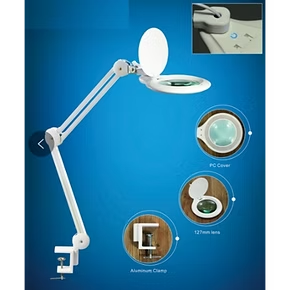
Splicers have backlit screens, but you still need ambient light to handle bare fiber, read sleeve part numbers, and inspect cleaves with a loupe. Two recommendations:
Overhead LED Strip
Mount a 24-inch LED strip above the splicing zone, color temperature 4000 to 5000 K. Avoid yellow incandescent — it makes fiber jacket colors hard to identify (blue and green look the same under 2700 K light).
Headlamp
Every splicing tech should wear a headlamp. It throws light exactly where you are looking, which is critical for finding tube fibers in a poorly-organized closure.
Avoid Direct Sun on the Screen
Splicer screens wash out in direct sun. If you must work outside, position the table so the splicer screen faces away from the sun, or use a small canopy.
Closure and Slack Management
The closure should sit at the back of the table, opened and supported so it cannot tip. For dome closures, a closure stand keeps the dome upright. For inline closures, a foam V-block holds the body steady.
Route slack fiber from the closure forward to the splicer in a single, gentle curve. Avoid:
- Bend radii smaller than 30 mm (1.2 inches) for unjacketed fiber
- Crossing slack loops over each other — they tangle when you pull a working fiber
- Letting slack hang off the table edge — gravity pulls fiber out of the splicer holders
Cleanliness Discipline
The single biggest cause of high field splice loss is dust on the cleave. Build these habits into your table workflow:
- Wipe the table with 99% IPA at the start of every job.
- Wipe the cleaver V-block before the first cleave and every 20 to 50 cleaves after.
- Inspect the splicer V-grooves with a flashlight at the start of every closure. If you see debris, clean per our V-groove cleaning guide.
- Cap any pigtail or jumper the moment it is not in use.
- Do not eat, drink, or vape at the splicing table. Crumbs and oil ruin good cleaves.
Wear laser safety goggles when handling live fibers or running OTDR shots from the splicing position.
Test Equipment Integration
The splicing table is also your test bench. Plan for in-process verification:
- Power meter — keep an optical power meter at the right edge for end-to-end loss checks.
- OTDR — the Fiber Ranger OTDR sits on a side shelf with a launch cord pre-attached.
- PON power meter — for live-network FTTH work, the PON power meter Pro verifies signal levels without disturbing the OLT.
- Visual fault locator — a red-laser VFL identifies macro bends and fiber breaks at a glance.
Field Setup Checklist (Tape This Inside Your Splicing Van)
| Step | Action | Done |
|---|---|---|
| 1 | Park van on level ground; deploy stabilizers if equipped | |
| 2 | Open table; lock all legs; verify level with a small bubble | |
| 3 | Wipe table surface with 99% IPA | |
| 4 | Place splicer center; connect power; power on; let warm up 5 min | |
| 5 | Position cleaver left of splicer; mount scrap container at front edge | |
| 6 | Place heat shrink, splice tray, and OTDR launch cord right of splicer | |
| 7 | Mount closure at back; route slack forward in single curve | |
| 8 | Set up overhead light; verify no glare on splicer screen | |
| 9 | Run an arc calibration and a test splice on scrap fiber | |
| 10 | Begin production splicing |
When You Are Done: Tear-Down Discipline
The end of the job is when most tools get lost. Use a tear-down sequence:
- Cap all pigtails and jumpers
- Empty the fiber scrap container into a sealed disposal jar
- Wipe the table with IPA
- Power down the splicer and let the oven cool before stowing
- Inventory tools against a written list before closing the van
A two-minute checklist at the end of every job saves you a $400 cleaver replacement when you discover at the next site that yours got left on the curb.