The Non-Negotiable Tools
These are the tools you cannot do FTTH work without. Every fiber technician needs every item on this list before they arrive at the first job site. Missing any one of these means either going back to the shop or doing substandard work.
Fusion Splicer
The most expensive and most important tool in the kit. A fusion splicer permanently joins two fibers. For FTTH work, you need a compact, field-rated unit with at least 200 splice-and-heat cycles per battery charge. The splicer should handle both standard single-mode (G.652) and bend-insensitive fiber (G.657A/B) found in drop cables.
Do not skimp on the splicer. A cheap splicer with inconsistent splice losses will cost more in rework and truck rolls than the price difference between it and a professional unit. See our fusion splicer buying guide for detailed specifications to evaluate.
Fiber Cleaver
A precision cleaver produces the flat, perpendicular fiber end faces required for low-loss fusion splices. The cleave angle must be under 1 degree for single-mode fiber -- anything higher increases splice loss. A good cleaver produces consistent sub-0.5-degree cleaves and has a blade life of 30,000-50,000 cleaves before replacement.
The cleaver is the second most important tool after the splicer. A perfect splicer cannot compensate for a bad cleave. Replace the blade on schedule -- a dull blade produces angled or lippy cleaves that cause splice loss spikes.
Fiber Strippers
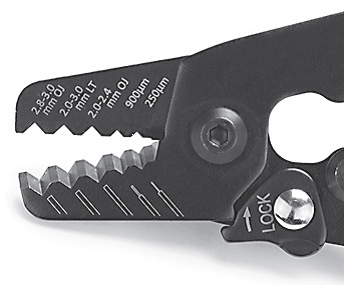
You need at least two strippers: a jacket stripper for removing the cable outer jacket, and a buffer stripper (typically a precision 3-hole stripper) for removing the 250-micrometer and 900-micrometer buffer coatings from the bare fiber. The buffer stripper must remove the coating cleanly without nicking the glass. A nick in the bare fiber creates a stress point that weakens the fiber and can cause it to break during or after splicing.
Fiber Cleaning Tools
Every connector must be cleaned and inspected before mating. Every time, no exceptions. You need one-click cleaners matched to your connector types: 2.5mm cleaners for SC and FC connectors, 1.25mm cleaners for LC connectors. You also need lint-free wipes and fiber-grade IPA (99%+ isopropyl alcohol) for wet cleaning when dry cleaning does not remove oil-based contamination. See our fiber endface cleaning guide for the full protocol.
Fiber Inspection Microscope
A fiber inspection microscope at 200x or higher magnification shows you what the naked eye cannot: dust particles smaller than the fiber core, oil films from fingerprints, and scratches from contaminated matings. Without inspection, you are guessing whether a connector is clean. Guessing is not a cleaning protocol.
Optical Power Meter and Light Source
After splicing, you need to verify the link works. An optical power meter measures the received optical power in dBm. A calibrated light source at the far end provides a known reference signal. The difference between the source power and received power is the total link loss. Compare this to the link loss budget to verify the installation meets specification.
Visual Fault Locator (VFL)
A VFL is a visible red laser (typically 650nm) that you inject into one end of a fiber. The red light is visible through the jacket at fault points: bad splices, tight bends, breaks, and macrobends. On FTTH drop cables, the VFL is the fastest way to verify continuity and locate faults before pulling out more expensive test equipment. Every fiber kit needs one.
Consumables and Supplies
Tools do the work. Consumables get used up on every job. Keep these stocked and organized.
- Heat-shrink splice protectors: One per splice. These protect the bare fiber at the splice point. Stock the size that matches your splicer's heater (40mm or 60mm are most common for FTTH).
- Splice-on connectors (SOC): Pre-polished connectors with a factory-cleaved fiber stub inside. You splice the field fiber to the stub, getting factory-quality connector end faces without field polishing. SOCs have largely replaced field-polish connectors for FTTH termination.
- Dust caps: Every connector gets a dust cap immediately after cleaning and before the connector is stored or transported. Loose dust caps cost pennies. Contaminated connectors cost hours.
- Cable ties, hook-and-loop straps, and cable management: Fiber has minimum bend radius requirements. Loose fiber stuffed into an enclosure without proper cable management will develop macrobends that add loss. Organize fiber with proper bend radius management at every splice point and enclosure.
- Alcohol wipes and cleaning supplies: IPA wipes for connectors, lens cleaner for the splicer cameras, cotton swabs for v-groove cleaning. These are consumed on every job.
- Spare electrodes: Splicer electrodes wear out after 2,000-5,000 splices. Carry a spare pair. Running out of electrodes in the field stops work completely.
Nice-to-Have Tools
These are not required for every FTTH job, but they make specific tasks significantly faster or handle situations that the core kit cannot.
OTDR (Optical Time Domain Reflectometer)
An OTDR characterizes the entire fiber link from one end, showing every event (splice, connector, bend, break) and its location along the fiber. For new construction acceptance testing and troubleshooting existing fiber plants, an OTDR is indispensable. For routine FTTH drop installations where you are splicing one fiber and verifying loss, an optical power meter is sufficient. See our OTDR basics guide for more detail on when OTDR testing is needed.
Fiber Identifier
A fiber identifier clips onto a fiber without cutting it and detects whether a signal is present and its direction of travel. This is useful when working in splice enclosures with multiple fibers and you need to identify which fiber is carrying live traffic before cutting anything.
Mid-Span Fiber Access Tool
Opens the outer cable jacket at a mid-point without cutting the fibers inside. Required for mid-span access on aerial or underground cables where you need to break out specific fibers for a drop connection without disturbing the through fibers.
Fiber Scope with Pass/Fail Analysis
Advanced inspection microscopes can automatically analyze the end face image against IEC 61300-3-35 criteria and provide a pass/fail result. This removes the subjectivity of visual inspection and provides documented compliance. Useful when certification documentation is required by the customer or project specification.
Building a Kit vs Buying Pre-Assembled
Pre-Assembled Kits
Manufacturers and distributors sell pre-assembled FTTH tool kits in a carrying case with the core tools included. The advantage is convenience: one purchase, one case, everything organized. Pre-assembled kits often include the splicer, cleaver, strippers, VFL, and cleaning tools at a bundled price lower than buying each item separately.
The disadvantage is inflexibility. The kit may include tools you do not need (a multimode light source when you only work with single-mode) or exclude tools you do need (splice-on connector holders specific to your preferred SOC brand). You are also locked into the quality tier the manufacturer chose for each component.
Building Your Own Kit
Selecting each tool individually lets you match tools to your specific work. If you splice 50 fibers a day, invest in the best cleaver available. If you do 5 splices a day, a mid-range cleaver is fine and the budget is better spent on a higher-end splicer or inspection microscope.
Building your own kit also means choosing your own carrying case or bag. Field technicians who climb poles, work in manholes, and ride bucket trucks have different case requirements than technicians who work in data centers and MDUs (multi-dwelling units).
The Practical Approach
Most experienced technicians start with a pre-assembled kit and replace individual tools as they wear out or as they identify specific needs. The splicer is the anchor purchase. Everything else is replaceable and upgradeable over time. Start with quality where it matters most (splicer, cleaver, inspection microscope) and fill in the rest as your work demands.
Organizing the Kit for Field Work
A disorganized kit wastes time on every job. Establish a layout and stick to it.
- Splicer and cleaver in padded compartments. These are precision instruments. A drop from a ladder onto concrete can knock a splicer out of alignment. Protect them.
- Consumables in accessible pouches. Heat-shrink sleeves, SOCs, and dust caps should be reachable without opening the main case. You use them constantly.
- Cleaning tools in a dedicated pocket. Keep cleaners, wipes, and IPA together and away from fiber debris. Cross-contamination defeats the purpose of cleaning.
- Test equipment (power meter, VFL) in a side pocket. You pull these out after splicing, not during. Separate them from the splicing tools.
- Trash bag or container for fiber scraps. Cleaved fiber scraps are glass needles. They embed in skin, furniture, carpet, and vehicle seats. Collect every scrap in a designated container. Never leave bare fiber scraps at a job site.