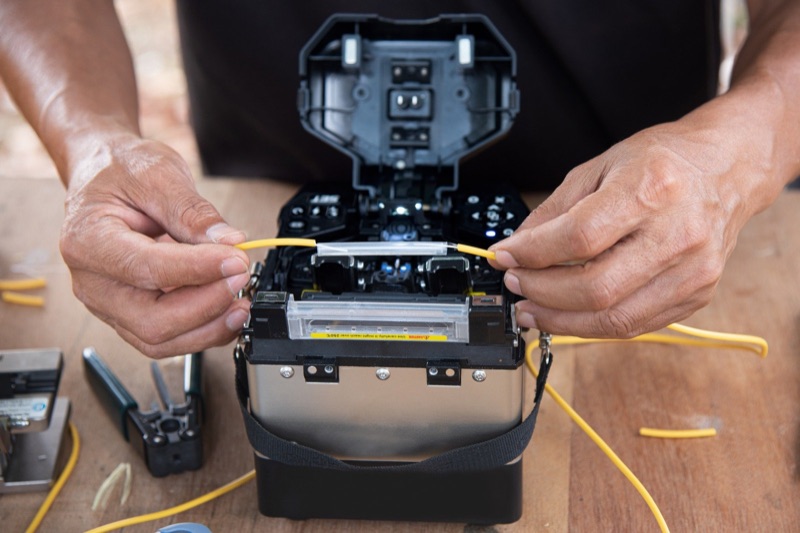
What a Fusion Splicer Does
A fusion splicer permanently joins two optical fibers by melting (fusing) their glass ends together with an electric arc. The result is a continuous glass path with extremely low loss -- typically 0.02 to 0.05 dB per splice. Fusion splicing produces lower loss, higher reliability, and longer lifespan than mechanical splicing, which is why it is the standard method for permanent fiber connections in OSP (outside plant), FTTH, data center, and campus backbone installations.
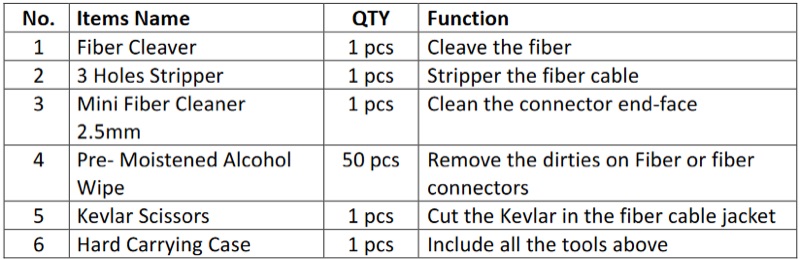
The splicer automates the critical steps: fiber alignment, arc discharge, and splice loss estimation. The operator's job is fiber preparation (stripping, cleaning, cleaving) and operating the machine. A good splicer makes the alignment and fusion process consistent and repeatable regardless of operator experience level.
Key Specifications to Evaluate
Typical Splice Loss
This is the most important number. Splice loss is measured in decibels (dB) and represents how much light is lost at the splice point. Lower is better. Modern core-alignment splicers achieve typical splice losses of 0.02 dB for single-mode fiber and 0.01 dB for multimode. These are average values -- individual splices may be slightly higher or lower.
For FTTH work, you need consistent splice losses under 0.1 dB to stay within the link loss budget. For backbone and long-haul work, every hundredth of a dB matters because the losses accumulate across dozens or hundreds of splices in a route.
Splice Time
The time from pressing the start button to completed fusion, excluding fiber preparation. Typical splice times range from 5 to 9 seconds. Faster is better for high-volume work. On a 288-fiber cable, saving 2 seconds per splice saves 10 minutes per cable. Over a week of splicing, that adds up to hours.
Heat Shrink Time
After fusion, a heat-shrink protection sleeve is placed over the splice and heated to seal it. Heat shrink times range from 8 to 30 seconds depending on the splicer's heater design. Some splicers have independent heaters that let you heat one sleeve while splicing the next fiber, effectively making heat shrink time zero in the workflow.
Battery Life
Measured in splice-and-heat cycles per charge. Field splicers need enough battery for a full day of work without access to AC power. Look for 200+ cycles per charge as a minimum for FTTH field work. Backbone splicers that stay near a truck or generator can tolerate shorter battery life. Always carry a spare battery for critical jobs.
Core Alignment vs Cladding Alignment
This is the most important design distinction. Core-alignment splicers use cameras and image processing to align the actual fiber cores before splicing. Cladding-alignment splicers align the outer glass surface (cladding) and assume the core is centered. Core alignment produces lower and more consistent splice losses because it compensates for core-to-cladding eccentricity -- the slight off-center positioning of the core within the cladding that exists in all fiber.
For single-mode fiber, core alignment is strongly recommended. The 9-micrometer single-mode core has very tight alignment tolerances. Cladding-alignment splicers can produce acceptable splices on single-mode fiber, but the consistency and average loss will be worse than core alignment.
Fiber Compatibility
Verify the splicer handles the fiber types you work with: standard single-mode (G.652), bend-insensitive single-mode (G.657A/B), multimode (OM3/OM4/OM5), and specialty fibers if applicable. Most modern splicers automatically detect fiber type from the splice profile and adjust arc parameters accordingly.
Ruggedization
Field splicers get dropped, rained on, and used in temperature extremes. Look for shock resistance ratings (MIL-STD-810G or equivalent), IP ratings for dust and water ingress (IP52 minimum for field use), and operating temperature range. A splicer that works in the lab but fails in a 100-degree splice enclosure on a pole in July is not a field tool.
Screen Size and Visibility
A larger, higher-resolution screen makes fiber alignment easier to verify and splice results easier to read. In bright outdoor sunlight, screen brightness and anti-glare coatings matter more than screen size. Touch screens are convenient but must work with gloved hands in cold weather.
Matching the Splicer to Your Work
FTTH and Drop Cable
High-volume single-mode splicing with small fiber counts (1-12 fibers per job). Battery life and speed matter most. A compact, lightweight core-alignment splicer with 200+ splice cycles and fast heat shrink is ideal. The splicer needs to handle both standard single-mode (G.652) and bend-insensitive fiber (G.657) found in drop cables and indoor routing.
OSP Backbone
High-fiber-count cables (48, 96, 144, 288 fibers) with long splice sessions. An independent heater is essential so you can heat one sleeve while splicing the next fiber. Core alignment is critical for backbone work because splice losses accumulate across the route. Mass fusion ribbon splicers dramatically speed up work on ribbon fiber cables.
Data Center
Controlled indoor environment with both single-mode and multimode fiber. Temperature and weather resilience are less important. Screen visibility in low light matters more. Consistent low-loss splicing on both SM and MM fiber is the priority.
Ribbon Splicers
Ribbon splicers fuse an entire ribbon of fibers (typically 12 fibers) in a single operation instead of splicing each fiber individually. On a 288-fiber cable using 12-fiber ribbons, a ribbon splicer reduces the number of splice operations from 288 to 24. This dramatically cuts splicing time on high-fiber-count jobs.
Ribbon splicers are significantly more expensive than single-fiber splicers and are only useful if you work with ribbon fiber cable. If your work is primarily loose-tube or FTTH drop cable, a single-fiber splicer is the right choice.
Field Serviceability
Fusion splicers require periodic maintenance: electrode replacement, v-groove cleaning, camera cleaning, and arc calibration. Evaluate how easy these tasks are to perform in the field:
- Electrode replacement: Electrodes wear out after approximately 2,000-5,000 splices. Replacement should be tool-free and take under a minute. Some splicers auto-detect electrode wear and prompt for replacement.
- V-groove cleaning: Debris in the fiber alignment v-grooves causes fiber misalignment and bad splices. The v-grooves should be accessible for cleaning with a cotton swab or specialized brush without disassembling the splicer.
- Arc calibration: The splicer periodically needs to recalibrate its arc parameters for the ambient temperature, altitude, and humidity. Most modern splicers do this automatically. Verify the splicer handles auto-arc calibration and displays an alert when manual calibration is needed.
- Manufacturer support: Check the manufacturer's warranty terms, repair turnaround time, and availability of loaner units during repair. A splicer in the shop for 4 weeks means 4 weeks of lost productivity.