TL;DR — Key Takeaways
- Four zones (A–D): Core, Cladding, Adhesive, Contact. Defect and scratch limits get stricter the closer you are to the core.
- Single-mode Zone A: zero defects, zero scratches — the strictest rule in the standard. Multimode is more permissive because the core is larger.
- PASS ≠ perfect, FAIL ≠ broken: a passing connector is "clean enough," and most fails clear with a one-click dry clean.
- Visual only: the standard covers end-face cleanliness, not insertion loss. You still need an auto pass/fail scope that applies the current edition.
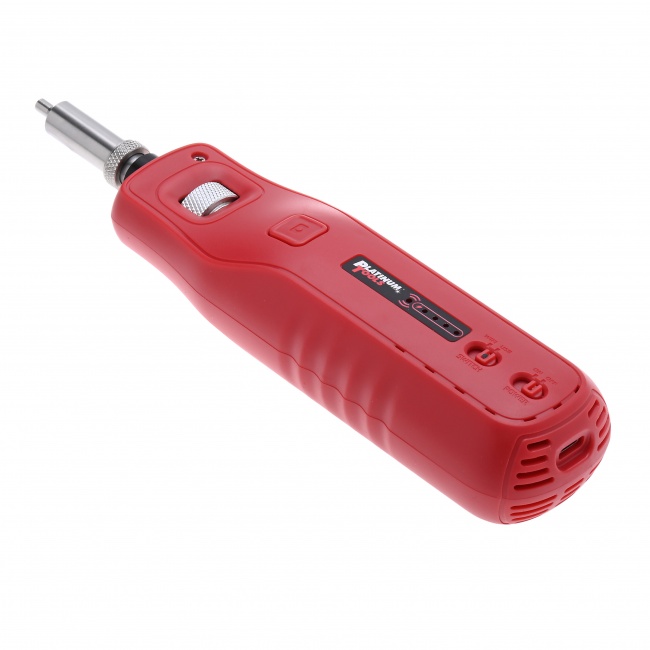
- Need to spec a scope? The QBL WiFi Fiber Microscope grades SM and MM to the latest IEC edition and saves images for acceptance docs.
What IEC 61300-3-35 Is
The full title is "Fibre optic interconnecting devices and passive components - Basic test and measurement procedures - Part 3-35: Examinations and measurements - Visual inspection of fibre optic connectors and fibre-stub transceivers." The number 61300 indicates the broader family of fiber test procedures, 3 indicates examinations and measurements, and 35 is the specific visual inspection chapter.
The standard exists because before it was published, every vendor had its own inspection criteria. A connector that passed one vendor's test could fail another's. With the standard adopted, a PASS on one IEC-compliant scope is equivalent to a PASS on any other IEC-compliant scope, which is the only sane way to run a multi-vendor industry.
The Four Zones
The core idea of the standard is that not every part of the connector end-face matters equally. A particle in the optical core is fatal. The same particle on the bare ferrule edge is irrelevant. The four-zone system codifies this physical reality.
Zone A: Core
0-25 micrometers diameter for single-mode, 0-65 micrometers for 50 micrometer multimode. The optical core where light travels. Strictest rules. Single-mode allows zero defects. Multimode allows up to four defects under 5 micrometers.
Zone B: Cladding
25-120 micrometers (single-mode) or 65-120 micrometers (multimode). The cladding glass surrounding the core. No scratches over 3 micrometers wide. Up to five defects between 0 and 3 micrometers permitted.
Zone C: Adhesive
120-130 micrometers. The narrow band where cladding glass meets the bonding epoxy. No specific defect limits because the area cannot affect optical performance directly. The standard treats this zone as a transition area.
Zone D: Contact
130-250 micrometers. The bare ferrule surface that contacts the mating connector. No defects that could migrate inward toward the core under mating pressure. Soft particles or hard particles that could shift positions are fails.
For a deeper exploration of each zone and what it means physically, see our companion article on Fiber End-Face Zones.
Single-Mode vs Multimode Criteria
The standard publishes separate grading templates for single-mode and multimode fibers because the optical impact of contamination scales with the size of the core relative to the defect.
| Zone | SM Scratches | SM Defects | MM 50um Scratches | MM 50um Defects |
|---|---|---|---|---|
| A (Core) | None | None | None > 3 um | 4 max < 5 um, none > 5 um |
| B (Cladding) | None > 3 um | 5 max 0-3 um, none > 5 um | None > 3 um | 5 max 0-3 um, none > 5 um |
| C (Adhesive) | No limit | No limit | No limit | No limit |
| D (Contact) | None that may migrate | None that may migrate | None that may migrate | None that may migrate |
The single-mode rule for Zone A is the strictest in the entire standard. Zero defects of any size, zero scratches, zero contamination. This is because a 1 micrometer particle on a 9 micrometer core covers more than 10% of the optical mode, which is enough to cause a measurable insertion loss spike. Multimode is more permissive because the larger core spreads the impact of any single defect.
APC vs UPC
The standard does not differentiate APC from UPC in the basic zone limits, but the inspection scope must apply the correct profile so the angled APC end-face appears centered after image processing. APC ferrules polished at 8 degrees produce a tilted-looking image when inspected with a non-APC tip. The LC/APC inspection tips are angled to compensate, producing a centered view that the IEC zone overlay can grade correctly. For more on connector polishes, see SC/APC vs UPC Connectors.
Free: IEC 61300-3-35 Pass/Fail Cheat Sheet
A one-page PDF with the four-zone diagram, the single-mode vs multimode defect limits, and the inspect-before-connect acceptance checklist. Drop your email and we'll send it over.
No spam. We'll send the resource and the occasional fiber-tooling tip. Unsubscribe anytime.
How Modern Scopes Apply the Standard
Auto pass/fail inspection scopes implement IEC 61300-3-35 in firmware. The processing pipeline is consistent across vendors:
1. Image Capture
The scope captures a 200x or 400x magnified image of the ferrule end-face. Resolution is high enough to resolve sub-micrometer defects.
2. Edge Detection
The scope identifies the boundary of the cladding (the 125 micrometer outer edge of the glass). This boundary becomes the reference point for the zone overlay.
3. Zone Overlay
Four concentric circles are drawn at the IEC zone boundaries (Zone A, B, C, D). The boundaries scale with the cladding size detected in step 2.
4. Defect Detection
The scope scans each zone for features that contrast against the polished glass background. Linear features become scratches; round features become particles. Each is sized in micrometers based on the calibrated pixel-per-micrometer ratio.
5. Pass/Fail Comparison
Defect counts and sizes per zone are compared against the IEC table for the selected fiber profile (single-mode UPC, single-mode APC, multimode 50um, multimode 62.5um). If any zone exceeds its limits, the result is FAIL. Otherwise PASS.
6. Result Display
The scope returns the binary result plus the defect count per zone, the captured image, and (on premium scopes like the QBL WiFi Fiber Microscope) the option to save the image with overlay baked in for documentation.
What Customers Spec on Real Projects
Most installation specifications reference IEC 61300-3-35 directly. Common contract language includes:
- "All fiber connectors shall be inspected per IEC 61300-3-35 prior to mating." Standard inspect-before-connect requirement.
- "Inspection results shall be captured and provided as part of acceptance documentation." Each connector requires a saved image with PASS/FAIL stamp.
- "Inspection equipment shall apply IEC 61300-3-35 grading automatically." Manual scopes are increasingly excluded; auto pass/fail is becoming the default.
- "Connectors that fail inspection after three cleaning attempts shall be replaced." Sets the limit for cleaning escalation before resorting to connector replacement.
- "Inspection shall be performed on both sides of every mated connection." Bulkhead and patch cord both inspected.
If your customer references IEC 61300-3-35 anywhere in the spec, you need an auto pass/fail scope, you need to capture and save images, and you need to be able to produce them on demand during acceptance walk-throughs.
Common Misunderstandings About the Standard
"PASS Means the Connector Is Perfect"
It does not. PASS means the connector meets the published IEC defect limits. A passing connector can have up to five small Zone B defects, contamination in Zone C, and a few non-migrating particles in Zone D. It is "clean enough" for reliable optical performance, not "spotless."
"FAIL Means the Connector Is Broken"
It does not. Most fails are reversible. A connector that fails on first inspection often passes after a one-click dry clean. Fails escalate to wet cleaning, and only after multiple cleaning attempts fail do you conclude the connector has embedded damage and needs replacement.
"The Standard Defines Insertion Loss Limits"
It does not. IEC 61300-3-35 covers visual cleanliness only. Insertion loss is governed by other documents (typically TIA-568 or ISO/IEC 11801 for structured cabling, or operator-specific budgets for outside plant). A connector can pass IEC visual inspection but still have insertion loss problems caused by ferrule misalignment, bad polish, or fiber damage upstream. For more on insertion loss, see our companion article on SC/APC vs UPC Connectors.
"All Scopes Apply the Standard the Same Way"
Almost. Older scopes may apply outdated editions. Some scopes have firmware bugs in edge cases (very small defects, defects right on a zone boundary). Always verify your scope is on current firmware. Two scopes from different vendors should give the same PASS/FAIL on the same connector.
Tools That Apply the Standard
Auto pass/fail inspection scopes do the heavy lifting of zone overlay, defect sizing, and rule comparison. Here is what to carry:
Auto Pass/Fail Scope
WiFi/USB scope with IEC 61300-3-35 firmware.
QBL WiFi Fiber Microscope ($1,249.99) supports SM and MM profiles with current edition limits.
Inspection Tips
Both male and female LC/APC tips for full bulkhead and patch-cord coverage.
The Bottom Line
IEC 61300-3-35 is the universal language of fiber inspection. It defines four zones, sets defect and scratch limits per zone, and makes inspection an objective binary rather than a subjective judgment. Every scope worth buying applies it. Every customer with a written spec references it. Every passing connector image is your proof of work.
Buy a scope that applies it correctly, save your inspection images for documentation, and use the standard as the common language between you, your customer, and the next technician who has to troubleshoot the link six months from now. For the field workflow, see How to Inspect Fiber Connectors. For the cleaning protocol that pairs with inspection, see Fiber Optic Cleaning Best Practices.
Related Reading
- Fiber End-Face Zones Explained — a deeper look at each of the four IEC zones and what they mean physically.
- How to Inspect Fiber Connectors — the step-by-step field workflow with a microscope.
- Fiber Optic Cleaning Best Practices — the cleaning escalation that clears most IEC fails.
- Fiber End-Face Defects: Pass or Fail — reading real defects against the IEC limits.
Ready to pass every acceptance inspection?
Tell us the connectors and fiber types you work with, and a fiber specialist will spec the exact auto pass/fail scope and tips you need to grade to IEC 61300-3-35 — no upsell.