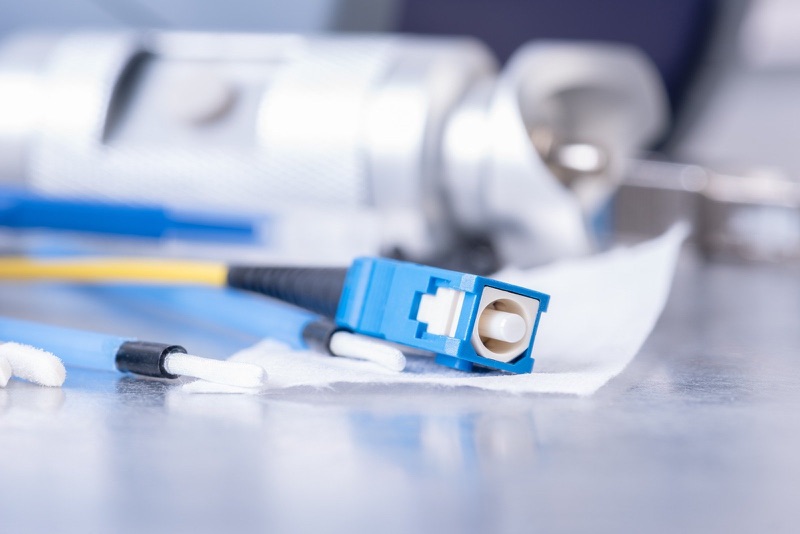
Why Fiber Connector Cleaning Matters
The core of a single-mode fiber is 9 micrometers in diameter. For reference, a human hair is about 70 micrometers. A typical dust particle floating in the air of a job site ranges from 1 to 50 micrometers. That means a single invisible speck of dust can be five times wider than the entire fiber core.
When a contaminated connector is mated, three things happen simultaneously. First, the particle blocks or scatters light, causing insertion loss -- the signal gets weaker. Second, the particle creates an unintended reflective surface, causing back-reflection that can interfere with laser transmitters upstream. Third, the physical contact pressure between mated connectors (typically 0.5 to 1.0 kg of spring force) can embed the particle permanently into the glass end-face, creating a scratch that cannot be cleaned away.
Industry data consistently shows that contamination is responsible for the vast majority of fiber network problems. Not bad splices. Not damaged cable runs. Not faulty equipment. Dirty connectors. The Fiber Optic Association estimates the figure at 85%. NTT's internal maintenance data shows similar numbers. The problem is so common because the contamination is invisible to the naked eye. A connector can look perfectly clean and still have dozens of particles on the end-face that are large enough to degrade the link.
The good news is that cleaning a fiber connector takes about 10 seconds and costs pennies per clean. The bad news is that skipping that 10 seconds can result in hours of troubleshooting, expensive truck rolls, and permanently damaged connectors that need to be re-terminated.
Types of Contamination
Not all contamination is the same. Understanding what you are dealing with determines whether a quick dry clean will solve the problem or whether you need to escalate to wet cleaning.
Dust and Airborne Particles
The most common contamination by far. Dust particles settle on any exposed end-face within seconds in a field environment. Even in data centers with filtered air handling, microscopic particles are everywhere. Dust is generally loose and not bonded to the glass surface, which means a single pass with a dry one-click cleaner removes the majority of particulate contamination. This is why dry cleaning is always the first step.
Skin Oil and Fingerprints
Human skin deposits oil on everything it touches. A single fingerprint on a ferrule end-face leaves a thin film of sebum (skin oil) that is transparent and completely invisible to the naked eye but creates significant signal degradation. Oil films are the most common reason that dry cleaning alone does not pass inspection -- the dry cleaning cloth slides over the oil rather than lifting it off the glass. If you see a smeared or hazy pattern on the end-face after a dry clean, oil is the problem. This requires wet cleaning.
Index Matching Gel Residue
Mechanical splices and some older connectors use index matching gel to bridge the air gap between fiber end-faces. This gel is viscous and leaves sticky residue on any surface it contacts. If a connector has been used in a mechanical splice or has come into contact with index matching gel, dry cleaning will smear the residue rather than removing it. Wet cleaning with IPA is required, and you may need multiple wet-dry cycles to fully remove the gel.
Airborne Chemical Deposits
In industrial environments, chemical vapors can condense on connector end-faces. Cable jacket outgassing in sealed enclosures can deposit a film over time. Cigarette smoke, spray paint overspray, and drywall dust in construction environments are all real-world contaminants that field technicians encounter. These deposits typically require wet cleaning and may need more aggressive solvents than IPA in severe cases.
Static Charge Attraction
Fiber ferrules are made of zirconia ceramic, which is an excellent insulator. Removing a dust cap, pulling a connector through a cleaning tool, or simply handling the connector in a dry environment generates static charge on the ferrule surface. This static charge immediately attracts any airborne particles in the vicinity. This is why you should connect immediately after cleaning and not set the connector down -- the clean ferrule is actively attracting contamination.
The Inspect-Before-You-Connect Protocol
This is the standard operating procedure defined by IEC 61300-3-35 and used by every major telco, ISP, and data center operator worldwide. The protocol has five steps, and no step is optional. Skipping any step increases the risk of mating a contaminated connector and causing permanent damage.
Step 1: Inspect the End-Face Before Cleaning
Before you clean anything, look at the connector end-face through a fiber inspection microscope at 200x minimum magnification. The WiFi/USB Fiber Inspection Microscope connects wirelessly to your phone or tablet, giving you a clear image of the entire end-face without squinting through an eyepiece in a cramped splice enclosure.
This first inspection tells you two critical things. First, what type of contamination is present -- dust (dry clean will work) or oil/film (wet clean needed). Second, whether there is existing damage to the ferrule -- scratches, chips, or pits that no amount of cleaning will fix. If the ferrule is physically damaged, cleaning is pointless; the connector needs to be replaced or re-terminated.
Step 2: Dry Clean with a One-Click Cleaner
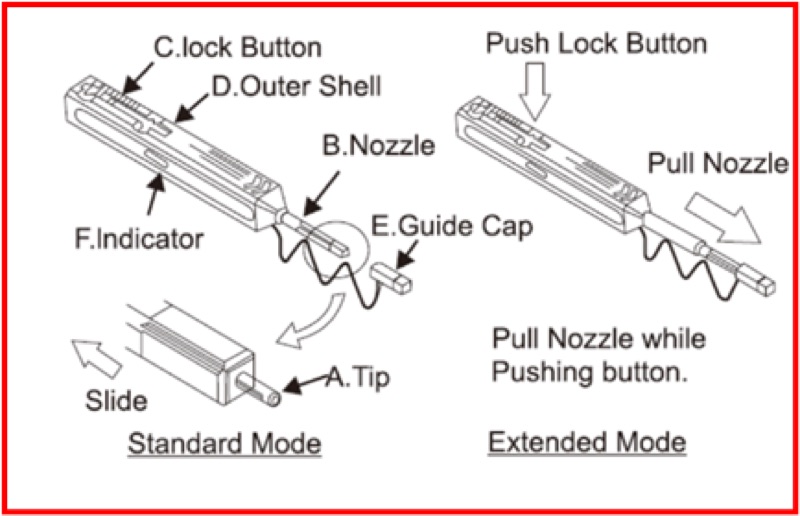
Always start with a dry clean. Select the one-click cleaner that matches the connector ferrule size (see the table below for the right cleaner for each connector type). Position the cleaner tip over the ferrule end-face and push until you feel or hear the click. One push equals one complete cleaning cycle. The mechanism advances a fresh section of dry microfiber cleaning ribbon across the end-face with controlled, consistent pressure.
One click is all you need. Do not push past the click. Do not double-click. The mechanism is designed to provide exactly the right pressure and contact area in a single stroke. Pushing harder or repeating the stroke on the same section of ribbon can re-deposit contamination you just removed.
Step 3: Re-Inspect After Cleaning
Put the connector back under the microscope and evaluate the end-face against IEC 61300-3-35 pass/fail criteria. The standard divides the end-face into concentric zones (core, cladding, adhesive, contact) and defines what contamination or damage is acceptable in each zone. The critical rule: Zone A (the core) must have zero defects and zero contamination. Any particle, any scratch, any residue in the core zone is an automatic fail.
If the end-face passes, proceed to Step 5. If contamination remains, proceed to Step 4.
Step 4: Wet Clean (If Dry Cleaning Was Not Sufficient)
Apply a small amount of fiber-grade isopropyl alcohol (99% or higher purity -- not the 70% from a first aid kit) to a lint-free fiber cleaning wipe. Gently wipe the ferrule end-face in a single direction. Do not scrub back and forth, as this can re-deposit contamination. Immediately follow the wet wipe with a dry clean using the one-click cleaner to remove any residual solvent from the end-face. IPA evaporates quickly, but it can leave a faint residue film if not removed before it dries.
Return to Step 3 and re-inspect. If the end-face still fails, repeat the wet-dry cycle up to three times. If the connector still fails after three wet-dry cycles, the contamination may be bonded to the glass or there may be damage beneath the contamination. Replace the connector.
Step 5: Connect Immediately
Once the end-face passes inspection, mate the connector immediately. Do not set it down on your work surface. Do not put a dust cap back on. Do not wave it around while you reach for the adapter panel. Every second the clean ferrule is exposed, it is collecting airborne particles and building static charge that attracts more particles. Clean, inspect, pass, connect -- in that order, without delay.
Cleaning Methods by Connector Type
Fiber connectors come in different ferrule sizes and physical formats. Using the wrong cleaner means the cleaning ribbon does not make proper contact with the entire end-face, leaving the edges or the center uncleaned. Match the cleaner to the connector.
| Connector | Ferrule | Recommended Cleaner |
|---|---|---|
| LC, MU | 1.25mm | CLEP 1.25mm Mini Fiber Cleaner |
| SC, FC, ST | 2.5mm | CLEP 2.5mm Mini Fiber Cleaner |
| MPO/MTP | Multi-fiber array | MPO Cleaner P or T Type |
| CS (Compact Simplex) | Next-gen | CS Connector End Face Cleaner |
| Bulkhead / Adapter ports | Various | CS Connector End Face Cleaner or scope-and-swab |
Cleaning LC Connectors
LC (Lucent Connector) is the dominant connector in data centers and increasingly common in FTTH central office equipment. LC uses a 1.25mm ferrule, which is half the diameter of SC/FC/ST. The CLEP 1.25mm Mini Fiber Cleaner is purpose-built for this ferrule size. The compact form factor fits into tight spaces between densely packed LC patch panels. For recessed connectors deep inside adapter panels or enclosures where the Mini cannot reach, use the CLEP 1.25mm Long-Reach variant with its extended barrel.
LC duplex connectors (two fibers side by side) require cleaning each ferrule individually. Push the cleaner onto one ferrule, click, then repeat on the second ferrule. Do not try to clean both ferrules simultaneously.
Cleaning SC Connectors
SC (Subscriber Connector) is the standard connector for FTTH ONTs, PON splitters, and outside plant fiber distribution. SC uses a 2.5mm ferrule. The CLEP 2.5mm Mini Fiber Cleaner handles SC connectors as well as the older FC (threaded) and ST (bayonet) connectors that share the same 2.5mm ferrule diameter.
SC/APC connectors (green housing, 8-degree angled polish) clean with the same 2.5mm cleaner as SC/UPC (blue housing, flat polish). The cleaning mechanism is the same regardless of polish type -- you are removing contamination from the end-face surface, and the angle does not affect the cleaning process.
Cleaning MPO/MTP Connectors
MPO (Multi-fiber Push-On) and MTP (the US Conec branded version) connectors have 8, 12, 16, or 24 fibers in a single rectangular ferrule. Standard single-fiber cleaners cannot clean an MPO -- the ferrule geometry is completely different. The MPO Cleaner P or T Type is the one we list.
MPO connectors are particularly sensitive to contamination because there are multiple fiber cores exposed on a single ferrule. A particle that might only affect one core on a single-fiber connector can bridge between cores on an MPO, potentially degrading multiple channels simultaneously. Clean MPO connectors with extra care, and always inspect after cleaning.
Cleaning Adapters and Bulkheads
Adapter ports (bulkheads) in patch panels and splice enclosures accumulate contamination from repeated connector insertions, dust settling through open ports, and contact with dust caps. Before inserting a freshly cleaned connector into an adapter, clean the adapter port itself. The CS Connector End Face Cleaner is designed for cleaning inside adapter ports where the ferrule faces are recessed and inaccessible to standard one-click cleaners. For adapters that cannot be reached with a mechanical cleaner, use a fiber cleaning stick (swab) moistened with IPA, inserted into the adapter port and rotated gently.
Dry Cleaning vs Wet Cleaning: When to Use Each
When Dry Cleaning Is Enough
Dry cleaning with a one-click cleaner resolves the majority of contamination scenarios encountered in the field. If the contaminant is dust, loose particulate, or light surface debris, a single dry clean typically passes inspection on the first attempt. Dry cleaning is faster (no solvent handling), leaves no residue, and the one-click mechanism ensures consistent pressure every time. Start with dry cleaning on every connector.
When You Need Wet Cleaning
Escalate to wet cleaning when dry cleaning does not resolve the contamination after one or two attempts. The most common situations that require wet cleaning:
- Fingerprint oils: Transparent film from skin contact that dry cleaning smears rather than removes.
- Index matching gel residue: Sticky residue from mechanical splice compounds.
- Adhesive residue: From tape, labels, or cable markings that contacted the ferrule.
- Film buildup: Gradual accumulation of outgassing compounds or environmental deposits in sealed enclosures.
- Post-polishing residue: On newly terminated or re-polished connectors that were not adequately cleaned after the polishing process.
Use only fiber-grade IPA at 99% purity or higher. Lower-concentration IPA (70%, 91%) contains water and additives that leave residue. Apply the IPA to the wipe, not directly to the connector -- flooding the ferrule with solvent can wick liquid into the connector body behind the ferrule, where it is impossible to remove and will slowly wick back out over time.
How to Verify Cleaning with a Fiber Microscope
Inspection is not optional. It is the only way to objectively verify that cleaning was successful. The human eye cannot see contamination on a fiber end-face -- the particles are too small and the ferrule is too small. You need magnification.
Minimum Magnification: 200x
IEC 61300-3-35 specifies 200x as the minimum magnification for connector end-face inspection. At 200x, a single-mode fiber core (9 micrometers) is clearly visible as a distinct circle in the center of the ferrule, and individual contamination particles as small as 1-2 micrometers can be resolved. Lower magnification (50x, 100x) may miss critical contamination in Zone A.
What to Look For
The microscope image shows the circular ferrule end-face with the fiber core visible as a small bright circle in the center. Around the core is the cladding (125 micrometers diameter), and beyond that is the ceramic ferrule material. You are looking for:
- Particles: Dark spots or bright spots on the end-face. Any particle in the core zone fails inspection.
- Scratches: Lines across the end-face surface. Scratches in the core zone that are deeper than surface level cannot be cleaned and require connector replacement.
- Film or haze: A cloudy or smeared appearance over part or all of the end-face, indicating oil or chemical residue. Requires wet cleaning.
- Edge chips: Damage at the edge of the ferrule from improper handling or repeated mating with contaminated connectors.
The WiFi/USB Fiber Inspection Microscope provides automated pass/fail analysis against IEC 61300-3-35 criteria, removing subjective judgment from the inspection process. The scope analyzes the image, identifies contamination and defects in each zone, and returns a clear PASS or FAIL result. This is faster and more reliable than manual visual assessment, especially in field conditions with poor lighting and time pressure.
Common Fiber Connector Cleaning Mistakes
Even experienced technicians develop bad habits over time. These are the most common mistakes that lead to contaminated connections, failed links, and damaged equipment.
- Touching the ferrule end-face: The most frequent source of oil contamination. Always hold connectors by the housing or boot, never by the ferrule. A single fingerprint deposits enough oil to fail inspection and degrade the link.
- Skipping initial inspection: Cleaning without knowing what type of contamination is present wastes time. If the contaminant is oil, dry cleaning alone will not remove it -- you will clean, fail, clean again, fail again, and only then try wet cleaning. Inspect first and choose the right cleaning method immediately.
- Reusing cleaning surfaces: One-click cleaners advance automatically, but if you are using lint-free wipes, you must use a fresh section for each wipe. Re-wiping with a used section re-deposits the contamination you just removed.
- Using canned air or compressed gas: Canned air propellants contain chemical compounds that deposit a film on the end-face. Compressed air from a shop compressor contains moisture and oil from the compressor. Neither is appropriate for fiber cleaning. Use only mechanical cleaning tools.
- Connecting without verifying: You cleaned the connector. Did the clean actually work? Without re-inspection, you do not know. The majority of dry cleans do pass on the first attempt, but the ones that do not can go undetected for months, causing intermittent problems that are extremely difficult to troubleshoot.
- Setting clean connectors down: A ferrule that passes inspection and then sits on a work surface for 30 seconds may no longer pass. In field environments with construction dust, drywall particles, or HVAC air movement, contamination lands on exposed ferrules almost immediately. The correct sequence is clean, inspect, connect -- with no pause between inspect and connect.
- Using the wrong cleaner size: A 2.5mm cleaner on a 1.25mm LC ferrule does not make proper contact. The cleaning ribbon bridges over the smaller ferrule without adequate pressure on the end-face. Match the cleaner to the ferrule diameter.
- Cleaning the connector but not the adapter: A perfectly clean connector mated into a contaminated adapter port picks up whatever is in the port. Clean both sides of the connection -- the connector end-face and the adapter port.
Building Your Field Cleaning Kit
The right cleaning kit depends on the connector types you encounter most frequently. Here is what to carry for common field scenarios.
FTTH / PON Technician
FTTH installations use primarily SC/APC connectors (at the ONT and splitter ports) and LC connectors (at the OLT). Your kit needs a CLEP 2.5mm Mini for SC and a CLEP 1.25mm Mini for LC, plus a fiber inspection microscope for verification. Add lint-free wipes and fiber-grade IPA for wet cleaning when needed.
Data Center Technician
Data centers are LC and MPO territory, often in high-density patch panels where connectors are recessed. Carry a CLEP 1.25mm Mini for accessible LC connectors, a CLEP 1.25mm Long-Reach for recessed panels, an MPO Cleaner for MPO/MTP connections, and a microscope.
Pre-Built Option
The Fiber Cleaning Kit includes cleaning tools for multiple connector types, lint-free wipes, and cleaning supplies in a portable case. It is a solid starting point for technicians building their first field cleaning setup or for companies that need to equip multiple trucks.
Related Reading
For more detailed information on specific cleaning topics, see these companion guides:
- Fiber Optic Cleaning Best Practices for Field Technicians -- deeper dive into IEC 61300-3-35 inspection zones and pass/fail criteria for single-mode and multimode fiber.
- Fiber End-Face Cleaning Guide -- focused guide on end-face geometry, polish types, and how cleaning interacts with APC and UPC connector surfaces.
Frequently Asked Questions
How do you clean fiber optic connectors?
Follow the inspect-before-you-connect protocol: (1) inspect the connector end-face with a fiber microscope at 200x or higher magnification, (2) dry clean with a one-click cleaner matched to the ferrule size -- 1.25mm for LC, 2.5mm for SC, dedicated cleaner for MPO, (3) re-inspect to check against IEC 61300-3-35 pass/fail criteria, (4) if contamination remains, wet clean with 99% IPA on a lint-free wipe then immediately dry clean again, (5) final inspection and connect immediately without setting the connector down.
Why is cleaning fiber connectors so important?
Contamination causes approximately 85% of all fiber optic network problems. A single dust particle on a single-mode fiber core -- which is only 9 micrometers in diameter -- can block a significant portion of the light path, causing insertion loss of 0.5 dB or more. Mating a dirty connector can also permanently embed debris into the glass end-face, ruining the connector. Cleaning takes 10 seconds; troubleshooting a dirty connector in an installed network takes hours.
What is the difference between dry cleaning and wet cleaning fiber connectors?
Dry cleaning uses a one-click cleaner or lint-free wipe without solvent to remove dust and loose particulates. It is the first line of defense and resolves the majority of contamination. Wet cleaning uses 99% or higher purity isopropyl alcohol (IPA) on a lint-free wipe to dissolve oils, films, and stubborn residue that dry cleaning cannot remove. Always try dry first. If the end-face fails inspection after a dry clean, escalate to wet, then immediately follow with another dry clean to remove residual solvent.
Which fiber cleaner do I need for LC connectors?
LC connectors use a 1.25mm ferrule, so you need a 1.25mm one-click cleaner. The CLEP 1.25mm Mini Fiber Cleaner is the standard choice for direct-access LC connectors. If the LC connector is recessed inside a high-density adapter panel or enclosure, use the CLEP 1.25mm Long-Reach Fiber Cleaner, which has an extended barrel to reach recessed ferrules. Both provide 800 or more cleaning cycles per cartridge.
Can you clean fiber connectors with regular alcohol wipes?
No. Regular alcohol wipes from a first aid kit or electronics cleaning kit are not suitable for fiber optic connectors. They may contain additives, moisturizers, or fragrances that leave residue on the ferrule end-face. They are also not lint-free, so fibers from the wipe material can deposit on the connector. Use only fiber-grade IPA at 99% or higher purity on purpose-made lint-free fiber cleaning wipes. Even better, use a one-click cleaner designed for the specific ferrule size, which eliminates solvent handling entirely for dry contamination.